Let AI run your A/B tests, safely: the complete guide
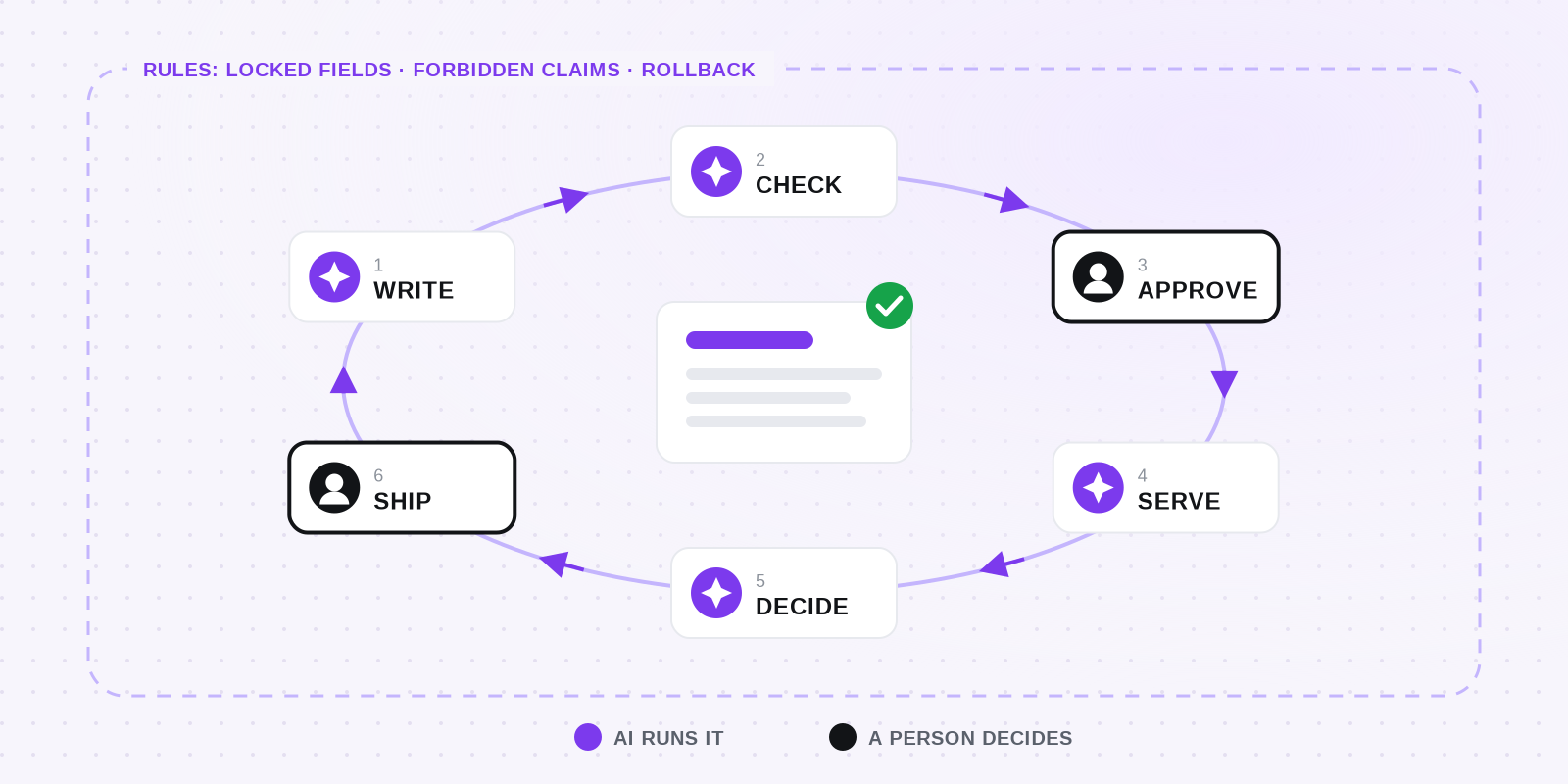
An AI can take over most of the busywork in A/B testing. It can write challengers, start them, move traffic toward the ones that convert and retire the losers. It shouldn't decide on its own what you test, which goal counts, what your site is allowed to claim, or when a winner goes into your code. Leave those four with a person.
Then put the AI inside rules it can't break. Give it a fixed set of fields it may edit and a list of claims it may never make. Have a second model check its work, cap the traffic any new variant gets, and roll a variant back automatically when it hurts sales or slows the page.
We make evolveAB, which does this for Next.js sites, so it gets a short section near the end. The rest applies whether you use a tool or not, and our AI CRO comparison covers the other tools.
#What an automated test loop does
Most AI A/B testing products run some version of the same six steps:
- Write. A language model drafts new versions of something on the page: a headline, a call to action, a pricing blurb.
- Check. Something decides whether a draft is allowed on your site at all.
- Approve. A person, or the system itself under rules you set, lets the draft go live.
- Serve and measure. Each visitor gets one version, and conversions are counted per version.
- Decide. Clear losers stop getting traffic, and a clear winner gets flagged.
- Ship. The winner replaces the original, ideally in your code rather than behind a testing script forever.
Steps 1, 4 and 5 are the easy ones to automate. Products differ on steps 2, 3 and 6, and that's also where things go wrong.
#What to hand over and what to keep
| Hand to the AI | Keep with a person |
|---|---|
| Drafting many variants of the same message | Choosing which page and which element to test |
| Rewording within a length and tone you set | Choosing the goal that counts as a win |
| Shifting traffic toward the leaders | Saying what your company may and may not claim |
| Retiring clear losers | Deciding when a winner becomes the new default |
| Starting the next challenger when a slot frees up | Prices, legal text, product names, links and images |
The left column is volume work, and an AI does it fast and cheaply. On evolveAB, one suggestion run (three variants written by one model and reviewed by a second) costs us about $0.0021. The right column is judgement about your business, and a mistake there can cost far more than the test will ever earn.
#The risks, and what stops each one
| What can go wrong | The rule that stops it |
|---|---|
| The AI writes something false ("guaranteed", "#1", a refund you don't offer) | A forbidden-claims list, plus a second model that reads every claim against facts you've written down |
| The AI edits something it shouldn't (a price, a disclaimer) | A fixed list of editable fields; everything else is locked in code |
| A variant "wins" by luck, because the system checks every hour | A stricter winning bar that holds up under repeated looks |
| A variant lifts sign-ups but hurts purchases | Guardrail goals that pause any variant that crosses a limit |
| A variant makes the page slower | Page speed measured per variant, with automatic rollback |
| The data stops updating and the AI keeps acting on old numbers | Automation that pauses itself when results go stale |
| A new, untested variant gets too much traffic | A traffic cap on anything new until it has data |
#False or off-brand claims
Language models make things up, so assume yours will. A list of words and phrases a draft must never contain catches the literal "guaranteed". It won't catch "you can't lose", so you also need a brand profile and a judge. The brand profile is your voice, your audience and the facts your site actually states, written down once by a person. The judge is a model from a different family than the writer, and it reads each draft against that profile. We go through each check in five checks between an AI's draft and your homepage.
#Edits to the wrong part of the page
It's easier to stop an AI touching the wrong thing than to catch it afterwards. Don't let a model edit any part of the page. Mark the regions it may test, list the fields in each one, and set limits: a headline of up to 60 characters, a badge from a fixed set. Prices, legal text, links, images and anything else not on the list stay as they are in your code.
#False winners from constant checking
A classic test is designed to be read once, at the end. A results page that re-evaluates every hour looks far more often, and each look gives random noise another chance to cross the winning line. Statisticians call this peeking, and Evan Miller's explanation is the classic one. When we simulated two identical variants checked ten times, a 95% bar picked a false winner about 15% of the time. At 99% it stayed at or under 5%, so our bar is 99% (the full story).
#Wins that cost you elsewhere
A headline that doubles clicks on "Start trial" but attracts people who never pay has lost you money. Give the AI one primary goal and a few guardrails, meaning goals a variant may not hurt beyond a limit, such as "purchases may drop at most 5%". Under automation, a variant that crosses a guardrail should pause without anyone having to notice first.
#Slower pages
A variant can win on copy and lose on speed. Measure Largest Contentful Paint, layout shift and interaction delay per variant in real visitors' browsers, and compare each with the original. Our rollback pauses a variant once there are enough page views to be sure it's clearly slower: LCP 20% worse, CLS up by 0.05 or INP 50 ms slower. The way the test is served matters too. A tool that swaps copy in the browser can hide the whole page for seconds while its script loads (the anti-flicker tax).
#Acting on stale data
Your results can stop updating because the site is down or a data job is failing. An automated loop that keeps retiring and approving variants through that is working from a picture of a site that no longer exists. Make the automation stop acting until the data is fresh again, while the experiment keeps serving what it already has. What our autopilot is allowed to do lists that rule with the others.
#Approval queue or full autopilot
There are two sensible levels of trust.
In an approval queue, the AI writes and checks, and a person reads each draft and approves, edits or rejects it. Nothing goes live without a click. Start here. You'll learn what the AI gets wrong for your brand, and each rejection reason you write improves the next round.
On autopilot, the system approves drafts that pass every check, retires losers and keeps up the number of variants you asked for, all on its own. Turn it on only when all of these are true:
- the experiment shifts traffic toward winners (a bandit), so retiring arms makes sense;
- the goal resolves quickly, within about a week, so the system isn't acting on half-counted conversions;
- automatic rollback is on;
- results are fresh and no guardrail is failing;
- a person has read and saved the brand profile the AI writes against.
Even then, keep two things manual: making a winner the new default, and starting a fresh round once the variant slots are used up. Our autopilot does neither.
#Bandit or fixed split
A fixed split gives every variant the same share of traffic for the whole test, so you get a fair measure of each one, losers included. A bandit starts even and then sends more visitors to whatever is doing best. You earn more during the test and learn less about the losers.
Automated testing usually means a bandit, because the point is a steady stream of new challengers in one spot. Use a fixed split when you need to know exactly how big the effect is, for example before a pricing change. Bandit or fixed split? covers how the bandit moves traffic and how it behaves on a small site.
#How much traffic you need
You need less traffic than a classic test does, but you still need some. With a few hundred visitors a week, expect a decision to take weeks rather than days.
A fast goal helps most. A bandit only learns from conversions it has already seen, so a click on "Start trial" within 7 days teaches it far more than revenue after 30. Run few variants at once, since every extra arm splits the same visitors thinner. And respect the floors. Our results read "Not enough data" below 200 visitors per variant or 20 conversions across both, and the bandit keeps traffic even until every variant has 100 visitors. Before that, any "leader" is mostly noise.
Our free sample size calculator works it out for your own numbers.
#Getting the winner into your code
A winner that lives only inside a testing tool has a cost. The tool keeps serving it, and the next developer to touch the page doesn't know the copy in the code is out of date. It's tidier to end with a code change. evolveAB can open a pull request that puts the winning copy into your repository. Your developer reviews and merges it, and the experiment archives itself once that deploy is live. The tool never merges anything itself.
#Doing it without a tool
You can run a careful version of this loop by hand:
- Write down what your site may claim, in a short document: the voice, the audience, the real facts and a list of forbidden phrases.
- Ask any capable model for five variants of one element, giving it that document and a hard length limit.
- Read every draft against the document. Throw out anything you'd have to defend to legal.
- Run a fixed split on your existing testing setup, with the primary goal and one guardrail chosen before you start.
- Decide the sample size in advance and check the result once at the end, or use a stricter bar if you'll look every day.
- Put the winner into your code and delete the test.
This works, but it's slow, because a person does steps 1, 3, 5 and 6 every round. A tool earns its price by running steps 2 to 5 continuously, and a good one keeps the rules above in force while it does.
#Using a tool instead
Most AI testing products still apply variants with a script in the browser, and they differ most in what stops a bad variant. Our comparison of AI CRO tools is sourced and dated, and covers Coframe, Webflow Optimize, Optimizely Opal, Fibr, GrowthBook and VWO.
evolveAB is built for Next.js sites. A developer marks the regions the AI may test and the fields in each, and the rules in this guide come built in: the five checks, the brand profile, guardrails, speed rollback, the 99% bar, a 20% traffic cap on new variants, autopilot with its conditions, and winner pull requests. Visitor data stays in your own database, and our cloud only receives totals (four numbers per variant). It can't change images or layout, run on Shopify or Webflow, or personalize by audience. We're also new, so there are no customer case studies yet, but our own homepage test is in the public experiments log. The AI autopilot page shows the product, and the quickstart sets it up.
#Questions
#Can AI run A/B tests on my website automatically?
Yes. Current tools can write variants, start them, shift traffic toward the better ones and retire losers without a person in each step. Keep the choice of page, goal and allowed claims with a person, and require automatic rollback before letting the system approve its own variants.
#Is it safe to let AI write copy for my live site?
It's safe when the AI can only edit fields you've listed, can't use phrases you've forbidden, has every claim checked by a second model against facts you've written down, and starts each new variant on a small share of traffic. Without those rules, expect it to promise something you don't offer sooner or later.
#What's the difference between an AI A/B test and a normal one?
The statistics are the same. What changes is who does the work. The AI drafts the variants and runs the loop continuously, where in a normal test a person writes each variant and decides when to stop. An automated system also checks results far more often, so it needs a stricter winning bar.
#Should an AI be allowed to approve its own variants?
Only under conditions: a bandit experiment with a fast goal, automatic rollback on, fresh data, no failing guardrail, and a brand profile a person has saved. Start with an approval queue, where every draft waits for a click, and move to autopilot once you trust the checks.
#How much traffic does AI A/B testing need?
There's no hard minimum, but with a few hundred visitors a week a decision takes weeks. Use a goal that resolves within about 7 days, test two or three variants at a time, and treat any early leader as noise until each variant has a couple of hundred visitors.
#What should an AI test first?
Pick the element with the most visitors and the clearest goal. That's usually the homepage headline or the main call to action, measured on trial or sign-up clicks. Our free A/B test idea report suggests tests for your own page.