A/B testing in the Next.js App Router: the complete guide
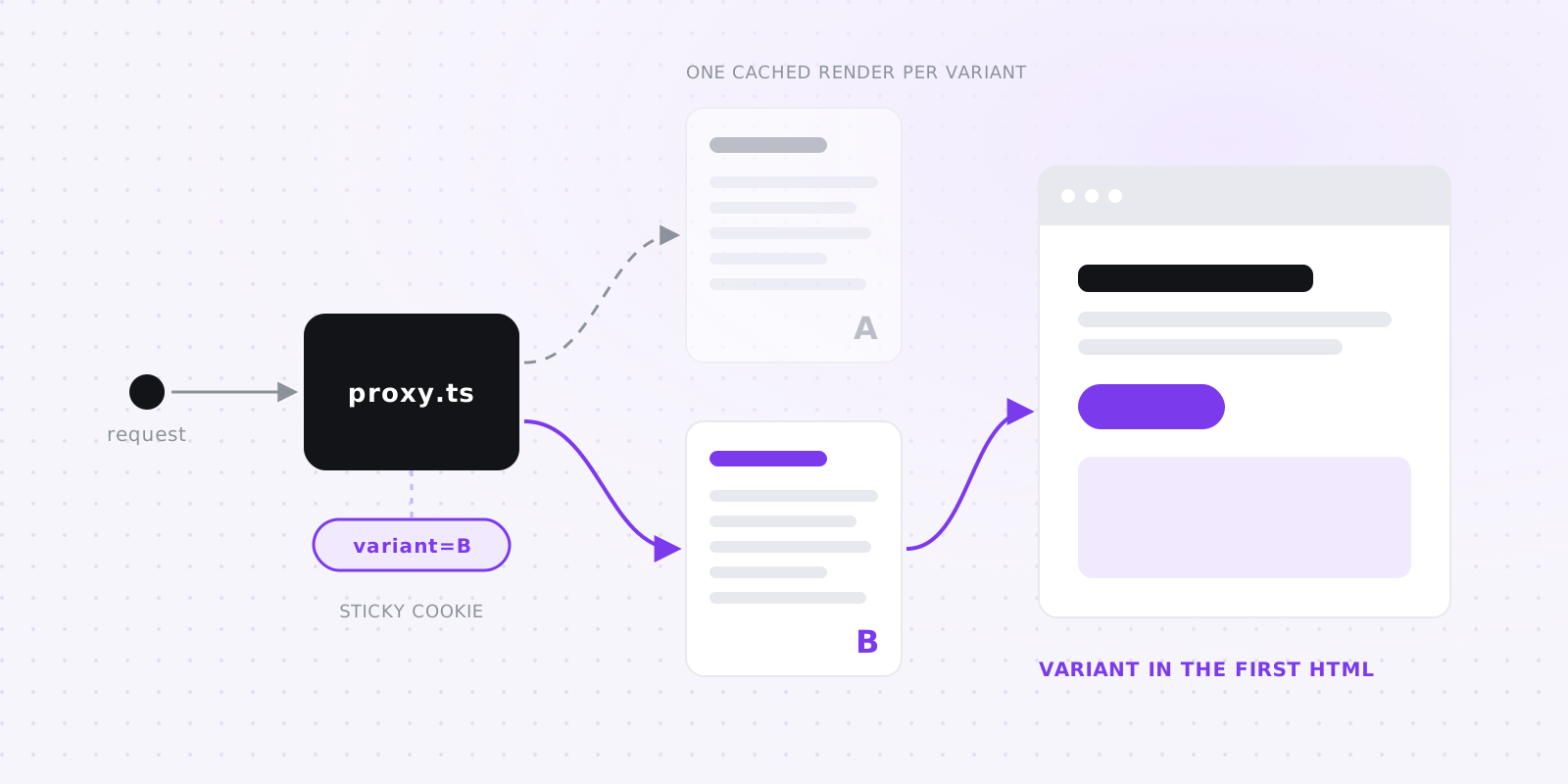
The short answer: pick the variant in proxy.ts (middleware.ts on Next.js 15), store it in a cookie so the visitor keeps it, and rewrite the request to a page that renders that variant on the server. Prerender one copy of the page per variant so each stays cached. Give bots and visitors without cookies the original, record one exposure per visitor, and decide your sample size before you start. Nothing in the browser swaps content, so there's no flicker and no anti-flicker snippet hiding the page.
Below are the steps, a working version you can build without any vendor (about 100 lines), and the tools that do it for you. We make one of them, evolveAB; it gets one paragraph near the end, and the comparison pages say where other tools fit better. We checked the Next.js facts against the Next.js 16 docs on November 11, 2026.
#Where the variant gets decided
You can choose the variant in three places, and two of them work well in the App Router.
In the browser, after the page loads. Visual editors and most older tools do this: a script loads, picks a variant and edits the DOM. The visitor sees the original first and then watches it change, unless the tool hides the page until its script has run. Those hiding snippets often default to a timeout of several seconds, and Largest Contentful Paint absorbs the whole wait (the numbers). In a React app the edits can also fight hydration.
In a Server Component, during render. You read a cookie with cookies() and render the matching variant. There's no flicker, but reading cookies() makes the whole route render on every request, so a marketing page that used to come from cache now runs on the server for each visit.
In the proxy, before render. The proxy runs before Next.js looks up the route. It can read the visitor's cookie, pick a variant, set the cookie on the response and rewrite the request to a URL that encodes the variant. Because the variant is part of the path, the page at that URL can be fully static. Vercel's Flags SDK calls this pattern precompute, and it's what this guide recommends.
#proxy.ts or middleware.ts
Next.js 16 renamed middleware.ts to proxy.ts. The proxy docs deprecate the old name because "middleware" got confused with Express middleware. The file does the same job, and the exported function is called proxy instead of middleware. A codemod renames both:
npx @next/codemod@canary middleware-to-proxy .
The runtime is what changes for A/B testing. Since Next.js 16 the proxy defaults to Node.js, and setting runtime in the proxy file throws an error. On Next.js 15.5, middleware.ts can opt into Node.js but defaults to Edge. Either way, keep the work small: the proxy runs on every request the matcher lets through, so it should read a cookie, do a little arithmetic and return. Fetching experiment config from an API on each request puts a network round trip in front of every page view.
Two details people trip over:
- The matcher is static.
config.matchermust be a literal, because Next.js reads it at build time and ignores variables. List the tested paths there so the proxy skips images and_next/static. - Rewrite, don't redirect. A rewrite keeps
/pricingin the address bar while Next.js renders/pricing-ab/b. A redirect would show the variant URL to the visitor and put it in their shared links. If you do have to redirect between test URLs, Google asks for a 302, not a 301.
On Vercel, any proxy adds a little time to the requests it runs on. We measured a proxy that does nothing at 18 to 23 ms on a first page view; your own code inside it should cost far less.
#Cookies and sticky assignment
A visitor should see the same variant every time, or your numbers mix both experiences. Use two cookies: one holds the assignment and one holds a random visitor id, so you count people instead of page loads. Set both from the proxy on the response, with SameSite=Lax, a long maxAge, and Secure on https.
Decide two things up front:
- What a returning visitor gets if you add a third variant halfway through. The simplest rule is to keep their saved variant if it still exists and assign again otherwise (those visitors then sit in two arms).
- Consent. The page works without testing cookies, so if your site asks for cookie consent, treat them like analytics cookies and serve the original without setting anything until the visitor agrees.
If www and the apex should share an assignment, set the cookie's domain to .example.com.
#Static or dynamic rendering
Once the proxy knows the variant, it has to pass it to the page. There are two ways, and they trade caching against flexibility.
Static: rewrite to a path per variant. The proxy rewrites /pricing to /pricing-ab/b, and app/pricing-ab/[variant]/page.tsx uses generateStaticParams to prerender every variant at build time, so each visitor gets cached HTML that already contains their variant. With several experiments on one page, encode all assignments in one path segment (the Flags SDK's precompute does this). Each new flag multiplies the number of combinations, and the precompute docs warn about that and about keeping ISR URLs under 1,024 characters.
Dynamic: pass the variant in a request header. The proxy sets a request header with NextResponse.next({ request: { headers } }) and the page reads it with headers(). The page file stays put, which helps when moving it would break something: a top-level app/[slug] route that would collide with the variant segment, a layout shared with child routes, or a page that's already dynamic. You lose the cached render per variant.
Use static for landing and pricing pages, and dynamic when the page renders per request anyway.
#Cache Components
Next.js 16 made cacheComponents a stable top-level option, and new create-next-app projects turn it on. Data is then dynamic by default, you opt into caching with "use cache", and each route gets a prerendered static shell with dynamic parts streaming in behind <Suspense>. For testing, that means:
- No route segment config.
cacheComponentsrejectsdynamicParamsandrevalidate, so the static pattern above changes slightly: dropexport const dynamicParams = false, mark the page"use cache", and callnotFound()for a variant you don't know.paramsis part of the cache key, so each variant still caches once. - Dynamic regions need a boundary. With the header approach, wrap the tested component in
<Suspense>; the rest of the page stays in the prerendered shell and only the tested region streams. Don't readcookies()orheaders()inside a"use cache"page, or the build will refuse or the page will become per-request.
#Bots, crawlers and SEO
Crawlers, link unfurlers and Lighthouse don't keep cookies, so each of their requests would look like a new visitor and land in your counts. Match common bot user agents in the proxy, serve them the original, and set no cookie.
Is that cloaking? Google's guidance on website testing says not to show Googlebot a different set of URLs than humans, and notes that "Googlebot generally doesn't support cookies", so it sees what browsers without cookies get. Serving bots the original page, the same one any cookieless visitor gets, fits that. Google also asks you to point each variant's rel="canonical" at the original URL (it prefers that to noindex for test variants), to use 302 redirects if you redirect at all, and to end the test and remove its code once you have an answer.
Anyone can reach your internal variant paths (/pricing-ab/b) by typing them in. The canonical tag keeps them out of the index, and returning a 404 for unknown variants stops people from inventing new ones.
#Counting: exposures and conversions
For each variant you need two numbers: how many visitors saw it, and how many of those converted.
- Record exposures when the visitor actually sees the variant. A prefetch or a bot can trigger the proxy without anyone looking at the page, so don't count at assignment. A small client component that sends one beacon on mount is enough, with an API route that stores one row per visitor per experiment and ignores repeats.
- Record conversions where they happen: a sign-up handler, a Stripe webhook, a button click. Attach the visitor id from the cookie. For server events with no cookie (a webhook), store your user id and link it to the visitor id at sign-up.
- Count a conversion only after exposure, inside a window you choose before the test (seven days is common). A sign-up from someone who never saw the page shouldn't count.
#Reading the result
Most bad A/B test decisions come from four mistakes, and each has a plain fix.
Deciding the sample size after the fact. Before you start, take your current conversion rate and the smallest lift worth detecting, and work out how many visitors each variant needs. At a 3% conversion rate, detecting a 20% relative lift (3% to 3.6%) at 95% confidence and 80% power takes about 13,900 visitors per variant. For a 10% lift it's about 53,000. Our sample size calculator does the arithmetic.
Peeking. A classic fixed-horizon test assumes you look once, at the end. If you check every morning and stop the first time it says "significant", your false positive rate ends up well above the 5% you think you have. Wait for the planned sample, or use a method built for continuous looks (sequential testing).
Ignoring a broken split. If you split 50/50 and get 5,150 against 4,850 visitors, a chi-square test puts the chance of that at about 0.3%. That's a sample ratio mismatch: something (a redirect, a cache, a bot filter applied to one arm) is dropping visitors unevenly, and you can't trust the conversion numbers until you find it.
Mixing up the two schools. A frequentist test asks "if there were no difference, how surprising is this data?" and gives you a p-value, while a Bayesian test asks how likely it is that B beats A, and by how much. Both are fine. The Bayesian answer is easier to explain to a marketer, though neither one rescues a test that's too small. Our significance calculator shows the Bayesian view for two arms.
Bandits shift traffic toward the arm that's ahead while the test runs, so fewer visitors see the loser. They suit cases where conversions during the test matter more than an exact effect size, and low-traffic pages where a fixed split would take months. In exchange, you get a less precise estimate of how much better the winner is.
#A DIY setup, no vendor needed
This version tests one headline on /pricing with Next.js 16 and Postgres. We built and ran it before publishing: the proxy assigns and sticks, bots get control with no cookie, unknown variant paths return a 404 and the beacon writes one row per visitor.
1. The proxy (on Next.js 15, rename the file to middleware.ts and the function to middleware):
// proxy.ts
import { NextResponse, type NextRequest } from "next/server";

const VARIANTS = ["control", "b"] as const;
const BOT = /bot|crawl|spider|slurp|facebookexternalhit|embedly|preview|lighthouse|headless/i;
const YEAR = 60 * 60 * 24 * 365;

export function proxy(request: NextRequest) {
  const isBot = BOT.test(request.headers.get("user-agent") ?? "");
  const saved = request.cookies.get("ab_pricing")?.value;
  const variant = isBot
    ? "control"
    : VARIANTS.find((v) => v === saved) ?? VARIANTS[Math.floor(Math.random() * VARIANTS.length)];

  const url = request.nextUrl.clone();
  url.pathname = `/pricing-ab/${variant}`;
  const response = NextResponse.rewrite(url);

  if (!isBot) {
    const cookie = { path: "/", maxAge: YEAR, sameSite: "lax", secure: url.protocol === "https:" } as const;
    if (saved !== variant) response.cookies.set("ab_pricing", variant, cookie);
    if (!request.cookies.has("ab_id")) response.cookies.set("ab_id", crypto.randomUUID(), cookie);
  }
  return response;
}

export const config = { matcher: ["/pricing"] };
2. One static page per variant. Move your pricing page here, and don't keep an app/pricing/page.tsx next to it.
// app/pricing-ab/[variant]/page.tsx
import type { Metadata } from "next";
import { Exposure } from "./exposure";

const HEADLINES = { control: "Simple pricing", b: "Pay for what you test" } as const;
type Variant = keyof typeof HEADLINES;

export const dynamicParams = false; // unknown variants 404
export const generateStaticParams = () => Object.keys(HEADLINES).map((variant) => ({ variant }));
export const metadata: Metadata = { alternates: { canonical: "/pricing" } };

export default async function Pricing({ params }: { params: Promise<{ variant: Variant }> }) {
  const { variant } = await params;
  return (
    <main>
      <h1>{HEADLINES[variant]}</h1>
      <Exposure experiment="pricing-headline" variant={variant} />
    </main>
  );
}
With cacheComponents: true, remove the dynamicParams line, add "use cache"; as the first line of the component, and after reading params add if (!(variant in HEADLINES)) notFound(); (imported from next/navigation).
3. The exposure beacon:
// app/pricing-ab/[variant]/exposure.tsx
"use client";
import { useEffect } from "react";

// Reports that this visitor saw the variant. The server reads the visitor id from the cookie.
export function Exposure({ experiment, variant }: { experiment: string; variant: string }) {
  useEffect(() => {
    navigator.sendBeacon("/api/ab", JSON.stringify({ type: "exposure", experiment, variant }));
  }, [experiment, variant]);
  return null;
}
4. The route that stores it, with whatever Postgres client you already use:
// app/api/ab/route.ts
import { cookies } from "next/headers";
import { db } from "@/lib/db"; // your Postgres client

export async function POST(request: Request) {
  const visitor = (await cookies()).get("ab_id")?.value;
  if (!visitor) return new Response(null, { status: 204 }); // bots and cookieless visitors
  const { type, experiment, variant } = await request.json();
  if (type !== "exposure" || typeof experiment !== "string" || typeof variant !== "string") {
    return new Response(null, { status: 400 });
  }
  await db.query(
    `insert into ab_exposures (visitor_id, experiment, variant) values ($1, $2, $3)
     on conflict (visitor_id, experiment) do nothing`,
    [visitor, experiment, variant],
  );
  return new Response(null, { status: 204 });
}
5. Tables and the result query:
create table ab_exposures (
  visitor_id text not null,
  experiment text not null,
  variant    text not null,
  at         timestamptz not null default now(),
  primary key (visitor_id, experiment)
);

create table ab_conversions (
  visitor_id text not null,
  goal       text not null,
  at         timestamptz not null default now()
);

-- Visitors and converters per variant, counting conversions within 7 days of exposure.
select e.variant,
       count(*) as visitors,
       count(*) filter (where exists (
         select 1 from ab_conversions c
         where c.visitor_id = e.visitor_id and c.goal = 'signup'
           and c.at between e.at and e.at + interval '7 days'
       )) as converted
from ab_exposures e
where e.experiment = 'pricing-headline'
group by e.variant;
Insert into ab_conversions from your sign-up handler, reading ab_id with cookies(). Paste the two rows into the significance calculator, or run a two-proportion test yourself.
What this leaves out: a dashboard, more than one experiment per page, traffic share (only part of your visitors in the test), pausing without a deploy, guardrail metrics, page-speed checks per variant, and cleanup when the test ends. Each takes a few more hours. If you run one or two tests a quarter, DIY is a fine answer.
#Using a tool instead
The tools that fit the App Router all decide the variant on the server and differ in what they do after that. Every vendor claim on the comparison pages links the vendor's own docs, checked on November 11, 2026.
- Vercel Flags handles assignment and targeting from the Vercel dashboard and serves static variants through the Flags SDK's precompute pattern. For results, its A/B testing docs send you to Web Analytics or your own analytics. Evolve vs Vercel Flags.
- GrowthBook is open source and warehouse-native, with deep statistics (Bayesian, frequentist, sequential, CUPED, bandits). It queries your warehouse, which can be Postgres. Evolve vs GrowthBook.
- PostHog puts experiments next to its product analytics and session replay, with a generous free tier, and you can bootstrap flags from the server to avoid flicker. Evolve vs PostHog.
- evolveAB (ours) runs this guide's proxy-and-rewrite pattern as an SDK. Raw events stay in your own Postgres, and only per-variant counts and sums go to our cloud for the statistics. An AI writes new challengers within limits you set, and a winning variant reaches your code as a pull request. It's App Router only. The quickstart takes about 30 minutes, or start a 30-day free trial, no card needed.
#Questions
#How do I A/B test in the Next.js App Router without flicker?
Decide the variant on the server before the page renders. Pick it in proxy.ts (or middleware.ts on Next.js 15), keep it in a cookie, and rewrite the request to a page that renders that variant. The HTML arrives with the variant already in it, so nothing in the browser has to swap content or hide the page.
#Should I use proxy.ts or middleware.ts?
Use proxy.ts on Next.js 16, where middleware.ts is deprecated. The job is the same, and npx @next/codemod@canary middleware-to-proxy . renames the file and function. On Next.js 15.5 you still use middleware.ts.
#Does A/B testing in proxy.ts break static pages?
Not if you rewrite to a path per variant and prerender each one with generateStaticParams; every visitor then gets cached HTML. Reading cookies() inside the page is what makes a route dynamic, so read the cookie in the proxy.
#How does A/B testing work with cacheComponents?
With cacheComponents: true, Next.js rejects route segment config such as dynamicParams and revalidate. Mark the variant page "use cache" and call notFound() for unknown variants; params is part of the cache key, so each variant is still cached once. If the variant comes in a header, wrap the tested component in <Suspense> so the rest of the page stays in the static shell.
#Is serving bots the original page cloaking?
No. Google's website-testing guidance says not to show Googlebot a different set of URLs than humans, and notes that Googlebot generally doesn't support cookies, so it sees what a cookieless visitor sees. Serving bots the original page, with a canonical tag on each variant pointing at the original URL, follows that guidance.
#How many visitors does an A/B test need?
It depends on your conversion rate and the smallest lift you care about. At a 3% conversion rate, detecting a 20% relative lift with 95% confidence and 80% power takes about 13,900 visitors per variant, and a 10% lift takes about 53,000. Work it out before you start, and don't stop early because a daily check looks good.
#Can I run A/B tests in Next.js without a third-party tool?
Yes. A proxy that assigns and sets a cookie, one static page per variant, a beacon that records exposures to Postgres and a SQL query come to about 100 lines, and this guide has a working version. You give up a dashboard and guardrails, and every pause or cleanup needs a deploy.