The anti-flicker tax: what hiding your page does to LCP
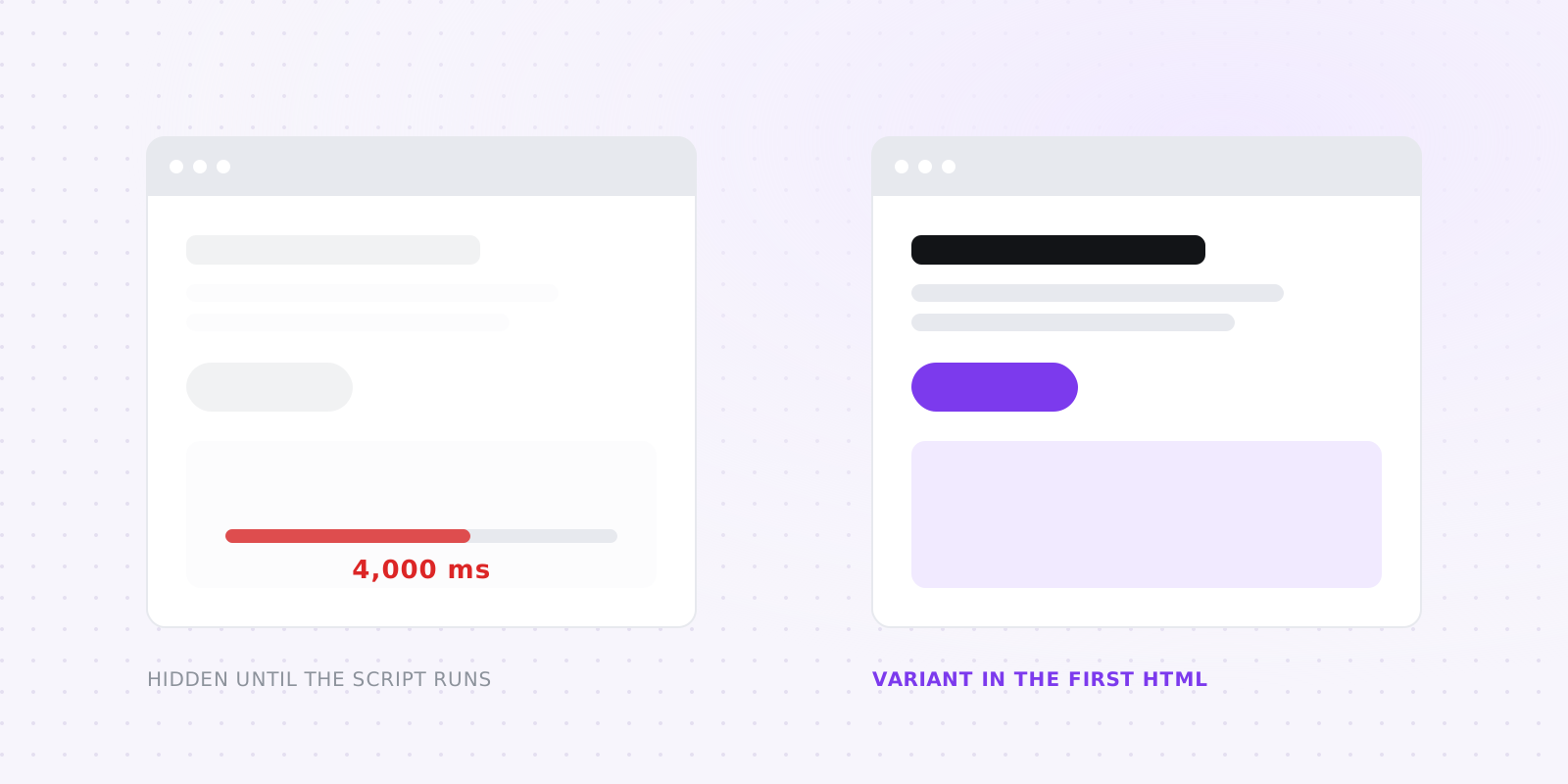
Anyone who has run a test from a visual editor has probably watched it happen: the page loads with the old headline, and a beat later the new one snaps into place. That's flicker. Every client-side testing tool fights it, because a script applies the variant after the browser has already started painting.
From inside the browser there are only two ways out. Either you show the original and swap it, and the visitor sees the flash, or you hide the page until the script has done its work. The second one goes by "anti-flicker snippet", and most tools turn it on by default.
#How long the page stays hidden
An anti-flicker snippet makes the page invisible, usually with opacity: 0 on the body or a class like Google Optimize's async-hide, and reveals it when the testing script finishes or a timeout fires, whichever comes first. The timeout sets the worst case, and the defaults are generous:
- Google Optimize shipped its snippet with a 4,000 ms default (Google's developer docs). Optimize itself shut down on September 30, 2023, yet copies of that snippet still sit in plenty of
<head>tags. - Webflow Optimize also defaults to 4,000 ms. Enterprise plans can set anything from 0 to 30,000 ms, and Webflow's help page warns that lower values bring back flicker (Webflow help).
Optimizely takes a different route: it recommends loading its snippet synchronously in the head (Optimizely support), which blocks rendering until the script has downloaded and run.
On fast wifi with a warm cache the script usually wins the race and the page shows up within a few hundred milliseconds. On a slow phone, your visitor waits for the timeout.
#What it does to Core Web Vitals
Largest Contentful Paint can't happen while the page is invisible, so LCP absorbs the entire wait. Vercel's guide on A/B testing and Core Web Vitals spells it out: the failsafe commonly sits at 4 seconds, and LCP takes all of it (Vercel KB). Google rates LCP as good at 2.5 seconds or less, measured at the 75th percentile (web.dev).
Published measurements are rarer than opinions. DebugBear tested one site and recorded an LCP of about 6.0 seconds with body hiding in place and about 2.7 seconds with the hiding overridden (DebugBear). One site isn't a study, and your numbers will differ; the direction won't.
The same Vercel guide makes a subtler point about layout shift. Without anti-flicker, swapping content in can push CLS past 0.1. With it, CLS can look healthy for the wrong reason, since the browser doesn't record shifts that happen while the page is hidden. A clean CLS score on a tested page might only mean nobody could see the problem.
#The browser team's own advice
Chrome's guidance on flicker-free client-side testing suggests blocking="render" with a strict execution budget of under 100 ms, says not to combine it with anti-flicker snippets, and recommends testing on the server wherever you can (Chrome for Developers). Put plainly, the people who build the browser think the cleanest fix is to stop deciding in the browser.
#Deciding before the first byte
A Next.js server already renders the page, so why not render the right variant from the start? evolveAB assigns it in the Next.js proxy, which reads a signed config bundle from memory (no network call) and rewrites the request to that variant's cached render, setting a sticky cookie on the way. The HTML arrives with the variant already in it, which leaves nothing to hide or swap and no testing script blocking the head.
That isn't free either, so here's the real number. Our code in the proxy takes 0.1 to 0.35 ms, but on Vercel any proxy at all adds roughly 20 ms to a first page view; a proxy that does nothing measured 18 to 23 ms in our tests. Twenty milliseconds before the first byte against up to four seconds of blank page is an easy trade, provided nobody pretends it's zero.
We also measure each variant's page speed in visitors' browsers and compare it with control. Auto-rollback pauses a variant that's clearly slower: LCP 20% worse, CLS up by 0.05 or INP 50 ms slower, once there are enough page views to be sure. A variant shouldn't get to win on sign-ups by quietly making the page slower.
#Measuring it on your own site
You don't need to switch tools to see what anti-flicker costs you. Run a throttled Lighthouse or WebPageTest trace on a tested page and look at the gap between first byte and first paint, then find the timeout in your snippet (it's usually a plain number in the code). If it says 4000 and your mobile LCP hovers around 2.5 seconds, you know where part of it goes.